
I Hate Couponing

This post may contain a link to an affiliate. See my disclosure policy for more information.

New here? Like us on Facebook below:

hate-couponing

Pin this Article

You know the feeling. The burnout. The feeling of dread when you know you have to go to the store but realize you haven’t cut out your coupons yet. The anticipation of receiving your Sunday newspaper to get caught up on the news only to remember that along with the paper comes coupons that you are supposed to save, use and NOT just place in the recycle bin. The feeling of guilt after leaving the grocery store knowing you didn’t use any coupons. You are burnt out.

I’ve been couponing for 8+ years now. Through the years I’ve had periods of time where I’ve loved everything about couponing - I’ve loved the highs of getting awesome deals (that felt more like “steals”), overflowing stockpiles, and finding those amazing deals where you know you will never get a better one (I mean really, can you beat getting paid to take home toothpaste by CVS?). But along with those highs, I’ve also had some lows. The moments where exhaustion from parenting, working full-time and trying to maintain a home have overcome me and instead of shopping with coupons, I have skipped shopping entirely because I didn’t want to feel the self-imposed guilt from knowing I spent full price. I’ve also been so frustrated that Tampa, Florida no longer gets Red Plum inserts that I’ve wanted to kick, scream and throw a tantrum while at the same giving up on couponing entirely. The highs are always fun. But the lows are always just as disappointing and frustrating.

Through my years running this blog, I’ve had countless friends give me excuses as to why they don’t coupon.

Some say “I only buy organic food.” (and then I look in their shopping cart and see non-organic ice cream, cake mix and chips…).

Others says “I don’t have the time.” (and then I see them commenting on Facebook all.day.long which leads me to think they do have time - they just use it on other endeavors.)

While others will say “I don’t know how to use coupons.” (and then I feel bad because it’s my job to help them learn how to use coupons and obviously, it’s my fault they are confused.)

But the truly honest will say “I hate couponing.” And to you, I want to tell you that it is OKAY for you to hate couponing.

If you are someone who experiences the highs and lows of couponing like me, when you get sick of couponing and find that it is more of a frustrating chore than an empowering endeavor, TAKE TIME OFF. Stop buying Sunday papers (Yep - I said that). Save your ink and computer paper and stop printing coupons. Go ahead and pay full price without paying attention to what is on sale for a couple weeks. And then, once you feel ready to start saving money again, ease back into couponing slowly. The world will not stop if you take time off from couponing.

If you are burnt out, examine how much time you spend couponing. You should not be spending hours and hours each week getting ready to shop. (Unless you are a frugal blogger like me in which case every minute of the day is spent looking at coupons and online deals 😉 )

When your grocery store’s sales flier comes out, flip through it and buy what’s on sale. If you need something that isn’t on sale and it’s urgent (i.e. bath tissue), buy it full price. (Yep - I said that too.) If you need something but have enough to last you a week or two, hold off paying full price and wait to see if it goes on sale. Then buy it.

Then, slowly integrate coupons back into your life. Start with printable coupons. I’ve found that within the past year, 75% of the coupons I use are printables. Honestly, if I stopped buying the Sunday paper, I probably wouldn’t miss many deals (especially since I no longer get Red Plum inserts being that I live in Tampa.)

I post high value coupons daily. Head HERE to bookmark my High Value Coupons page and once you are ready to start using coupons, follow this page. And once you are ready to buy what’s on sale, head HERE to see if I post your local grocery store’s coupon matchups. I try to do all of the hard work for you.

If you are saying “I hate couponing”, take time off to regroup. Once you are ready to start couponing again, it will be fun and you will once again be empowered as you save money that you can put towards debt, savings or luxury items. Couponing should be enjoyable. Not another job. Let’s be honest, we all have a lot of jobs already don’t we?
Subscribe to daily email updates and be entered for a chance to win $50 cash!


Print Friendly and PDF

Tips on Saving: Save Time Using the “Item Search” Feature

This post may contain a link to an affiliate. See my disclosure policy for more information.

New here? Like us on Facebook below:

Did you know you can literally search for any item or brand on Addicted to Saving? Whether you’re looking for generic terms like “milk” or “carpet cleaner,” or specific brands like Huggies or DiGiornos, you can see where your search term is on sale this week, see if there are any coupons to match, and you never have to leave Addicted to Saving to do it. As long as it’s a store I feature here on Addicted to Saving, then you’re in good shape.

For example, let’s say you’re running low on diapers and you want to see the best deal right now. There are a couple of different ways to get to the Item Search Feature.

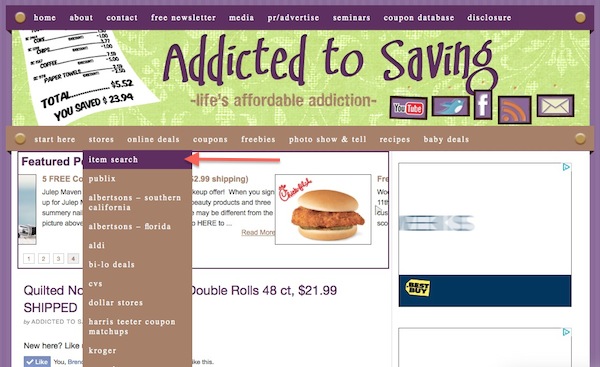
The first way is to simply place your cursor over the STORES category and select the Item Search option:

a2s-screenshot

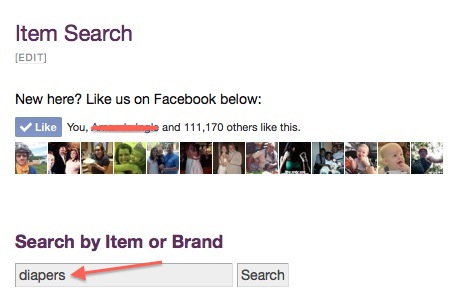
You’ll then be taken to the Search Page where you can enter your Item or Brand (in this case, diapers).

a2s-screenshot2

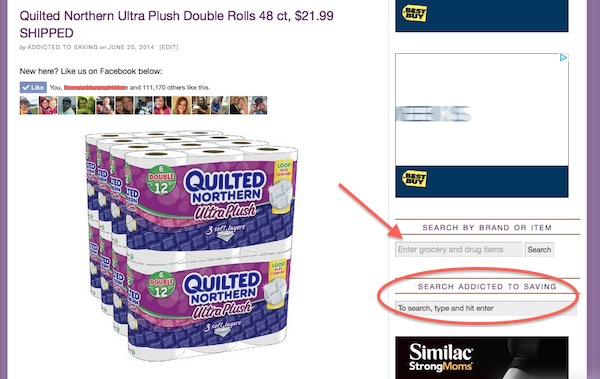
You can also find the Item Search feature on the right hand side of the page, just under the fold, as noted here:

a2s-screenshot1

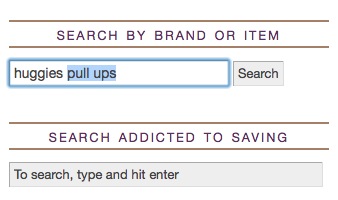
The saves you a little time because you can type in your Search Query right here versus being sent to a separate page. Note that the arrow above indicates a Search by Brand or Item Query of just the current ads, whereas the Search Addicted to Saving Query will search all of Addicted to Saving. You want to use the Search by Brand or Item query. Below you can see the direct query search item. Note that when you type in your item, it will remember your past searches and suggest them (in blue):

Screen Shot 2014-06-20 at 3.29.22 PM

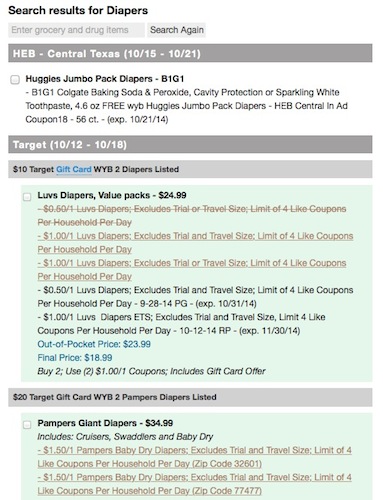
Once you type in your Search Item or Brand, then simply hit ENTER and you will get a list of your search item or brand result from every store where it’s currently on sale. In some cases, if the upcoming ad is ready, you will get the results for this week and the following week.

Screen Shot 2014-10-17 at 2.30.29 PM

Since I installed this feature, I save myself a TON of time every week. Quite frankly, when a new coupon comes out and I want to see if there’s a matchup available, this is exactly what I do. So if you see a great coupon but aren’t sure where to match it, this is the feature you should use! I’ve had it up for a while but am just not getting around to highlighting it.

Hope this helps and Happy Saving!

Subscribe to daily email updates and be entered for a chance to win $50 cash!


Print Friendly and PDF

What Is Walmart’s Savings Catcher App?

This post may contain a link to an affiliate. See my disclosure policy for more information.

New here? Like us on Facebook below:

walmart-savings-catcher

Have you heard about the new Savings Catcher tool from Walmart? In an effort to make sure that they stand by their commitment to have “unbeatable” prices, they are trying to prove it in a pretty unique way.

Walmart’s Savings Catcher is designed to get you the lowest price possible on any item that’s featured in a local competitor’s ad. If Savings Catcher finds a lower advertised price, then Walmart will actually give you an eGift Card for the difference. Wow. You have to do it within 7 days of the purchase, so keep that in mind.

Here’s how it will work.

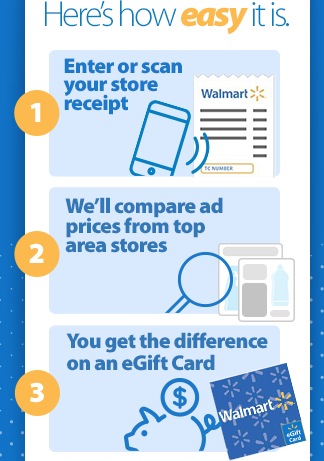
1) Go to your smart phone’s app center and search SAVINGSCATCHER, then download the app.
OR
Go to Walmart.com and Create an Account.

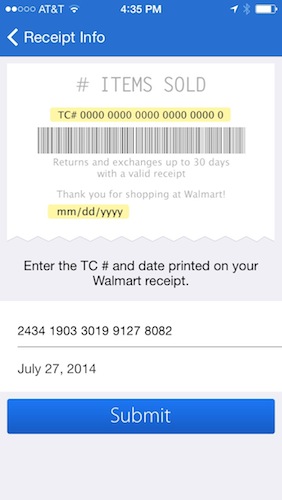
2) Enter your your receipt number online or scan the barcode by downloading the Walmart SAVINGSCATCHER App.

walmart-screenshot

3) The app will search for the price of any local competitor’s printed ad for an identical product. If Savings Catcher finds a lower advertised price, you get the difference via a Walmart eGift Card!

Sounds pretty cool, right? Now I tried to do it on my latest Walmart run, but as you can see from the screenshot of my phone, it was 8 days ago.

Of course I have a ton of FAQ’s myself on this program, but here are some of the more common ones. To see the FAQ’s, go to Walmart.com and Create an Account and you’ll see the full list. Below is taken directly from Walmart.com as of 8/4/14. If this is incorrect, please let me know and I will update.

Is there a minimum purchase required?

No. There is no minimum purchase requirement. Simply submit your receipt to get started.

How many receipts can I submit?

You can submit up to 7 receipts per week to Savings Catcher.

What types of promotions does Savings Catcher include?

Savings Catcher compares eligible items on your receipt to items found in the print and digital weekly ads of top retailers in your area. The ads must be valid at the time you made your Walmart purchase and include a specific item price.

Does Savings Catcher compare all items on my receipt?

Savings Catcher applies to many items sold at Walmart stores. This includes:

  • Most groceries such as cereal, rice and most fruits and vegetables except for: store brand items, deli, bakery and weighed items like meat.
  • Consumable items such as paper towels, bleach and trash bags.
  • Health and beauty items such as shampoo and makeup.
  • Select general merchandise items.

Savings Catcher does not currently apply to:

  • Store brands, deli, bakery and weighed items like meat.
  • General merchandise items, (including, but not limited to, electronics, media and gaming, toys, sporting goods, housewares, small appliances, home décor, bedding, books and magazines, apparel and shoes, jewelry, furniture, office supplies and seasonal products).
  • Non-branded items.
  • Tobacco, firearms, gasoline, tires, prescription drugs, optical and photo products and services, or products that require a service agreement such as wireless, automotive or financial products.

Which retailers’ advertised prices do you compare to Walmart’s prices?

We compare advertised prices from the top retailers located nearby the Walmart store where you shopped. When you submit your receipt using our app, you will see the number of top competitors near the Walmart store where you shopped. The name of each competitor will then move across the screen.

What types of promotions does Savings Catcher not include?

Savings Catcher does not compare the following types of offers:

  • Items that require a separate purchase to get the advertised price (example: “Buy oatmeal to get cereal for $1.”)
  • Items with no actual price that require a purchase to get a free product (example: “Buy both oatmeal & cereal to get milk for free.”)
  • Items that require a purchase to get a gift card (example: “Buy a 12 pack of paper towels to get a $5 gift card.”)
  • Buy one get one free (BOGO) deals where no item price is listed (example: Peter Pan Peanut Butter, buy one, get one free. Save up to $2.50.”)
  • Going out of business or closeout prices.
  • Percentage off (example: “All mascara, 40% off.)

Does Savings Catcher apply to my online purchases?

No. Savings Catcher applies to your in-store purchases only.

Do my savings accumulate?

That’s entirely up to you. You have the option to accumulate your Rewards Dollars and build your balance in Savings Catcher or transfer it onto a Walmart Rewards eGift Card whenever and as often as you choose. If you haven’t redeemed your Rewards Dollars at the end of the calendar year, Walmart will automatically transfer them onto a Walmart Rewards eGift Card and notify you.

What happens if I use coupons?

No problem, you can still use Savings Catcher. If you use a coupon, Savings Catcher will compare the original Walmart price of the item, before the coupon was applied, to other stores’ advertised prices for the same item. For example: You bought cookies at Walmart. The shelf price was $3 and you used a coupon for $0.25, so you paid $2.75. If Savings Catcher finds that a competitor advertised those same cookies for $2.00, Savings Catcher will still credit you $1.00, even though you paid only $2.75 at Walmart.

Can I submit old receipts?

Your receipt needs to be 7 days old or less. For example, if you shopped on Tuesday, you have until the following Monday to submit your receipt.

What if I lost my receipt before I had the chance to submit it?

For Savings Catcher to work, we need to have the TC number and date from your receipt. We cannot process your receipt without it.

Why is my receipt invalid?

There are a few reasons why you me be receiving an “invalid” message when you try to enter your receipt:

  • The TC number and purchase date may have been entered incorrectly. Check the numbers carefully and try again.
  • Your receipt may be older than 7 days. For example, if you bought your items on Tuesday this week, you have until Monday of next week to enter it into Savings Catcher.
  • The Walmart store where you shopped is not eligible for Savings Catcher.

When will I get my results back?

Savings Catcher will send you your results within 72 hours of receipt submission. As soon as your results are ready, we will let you know by email or through the Walmart app. If for some reason your results are not ready within 72 hours, feel free to contact us using the “Contact Us” button in the Savings Catcher section on our full site and the “Give Feedback” option in the main menu on our app.

For more answers to your FAQ’s, download the app or go to Walmart.com HERE and sign up!

Subscribe to daily email updates and be entered for a chance to win $50 cash!


Print Friendly and PDF

How to Use a B2G1 Coupon with a Publix BOGO Sale

This post may contain a link to an affiliate. See my disclosure policy for more information.

New here? Like us on Facebook below:

b2g1-dial-body-wash-coupon

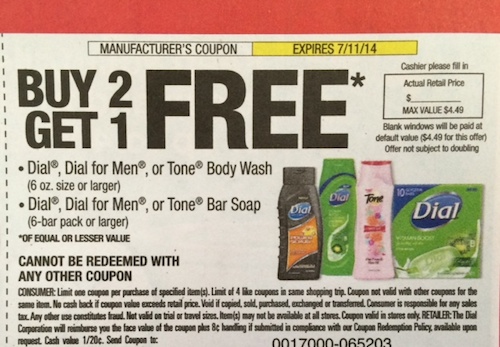
There has been a lot of discussion on the B2G1 Dial or Tone Regular or For Men Body Wash or Bar Soap, exp. 7/11/14 (RP 06/15/14) coupon that was in our Red Plums from Sunday’s paper (or for me, the Tuesday flyer b/c Red Plum no longer puts inserts in my paper!). Since there are some questions on how this coupon would work with a BOGO sale (and it’s on sale BOGO today for those of you who have a Thurs-Wed sales cycle), I thought I would take the time to explain how it works!

First of all, a B2G1 coupon can be used with a BOGO sale at Publix. However, the way the coupon will be applied depends on where you live.

  • If you live in the “land of true BOGO’s,” this means you pay full price for one item on a BOGO sale, and you literally get the second item for free.
  • If you live in the “land of 50% off BOGO’s,” this means each item is actually 50% off.

This is important because the coupon works differently in each scenario. So, as an example, I’ll use the B2G1 Dial coupon with the BOGO sale at Publix.

Scenario #1 - Land of True BOGO’s
Buy six Dial Body Wash, Assorted Varieties, 16 oz, BOGO $3.99 for two
Minus two B2G1 Dial or Tone Regular or For Men Body Wash or Bar Soap, exp. 7/11/14 (RP 06/15/14) coupons
Total Due: $3.99 or $0.67 each
Explanation
You’re buying three at $3.99 and getting three free.
$3.99 x 3 = $11.97 subtotal
Minus two B2G1 free coupons (coupon value in this case is $3.99 each)
Subtotal of $11.97 - $7.98 ($3.99 x 2) for the value of the coupons
Total Due: $3.99 or $0.67 each

Scenario #2 - Land of 50% BOGO’s
Buy three Dial Body Wash, Assorted Varieties, 16 oz, BOGO $3.99 for two
Minus one B2G1 Dial or Tone Regular or For Men Body Wash or Bar Soap, exp. 7/11/14 (RP 06/15/14) coupons
Total Due: $3.98 or $1.33 each
Explanation
You’re buying three at 1.99
$1.99 x 3 = $5.97
Minus one B2G1 free coupons (coupon value in this case is $1.99 each)
Subtotal of $5.97 - $1.99 for the value of the coupons
Total Due: $3.98 or $1.33 each

Additionally, there’s a $1/1 Dial Body Wash (Ibotta Deposit) deposit which makes the deal even better.

Hopefully this helps clear up any confusion you might have on how to use a B2G1 coupon with a Publix BOGO sale.

Subscribe to daily email updates and be entered for a chance to win $50 cash!


Print Friendly and PDF

How to See Addicted to Saving on Facebook

This post may contain a link to an affiliate. See my disclosure policy for more information.

New here? Like us on Facebook below:

**I”m reposting this since many of you have recently commented that you’re unable to see my Facebook posts. Enjoy my rant post. :)

Facebook.

Where do I start? I have been trying to carve out some time in this busy season to vent lament about Facebook, so I will try to keep it at a minimum and tell you how you can best follow Addicted to Saving in your Facebook account.

Did you realize that Facebook limits the amount of posts that you actually see from companies and blogs that you’ve “liked”? For Addicted to Saving, only about 20% of the people who “like” us usually see my posts. That was until recently. Facebook has made some changes to their algorithms, and now very very few of the 100,000+ followers of Addicted to Saving actually see my posts in their news feed.

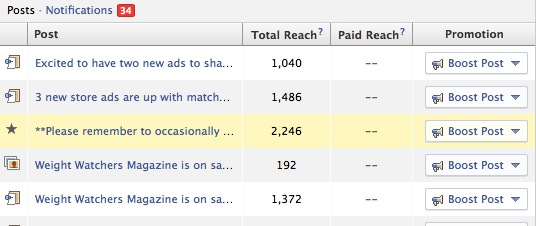
For instance, let me show you a screenshot of my “insights” page, which allows me to see the “reach” of each post (ie, how many of you actually see the post). This is from two Saturdays ago right when Facebook made the switch, and you can see that they cut the amount of readers who can actually view my posts by basically 75%!


The number of Facebook likes who would see my posts before Facebook made the algorithm switch was around 20,000 for each post. After the switch, it was typically less than 5000.

**UPDATE** Facebook has recently decided to show even less page posts, whether it’s Addicted to Saving or one of your other favorite blogs. This is light of their recent findings that people engage less with page posts which are “text” only (and probably 3/4 of my posts are this way). You can read about this report HERE. You see the numbers above, but they are even worse now. Below is a screenshot from this morning’s posts:

Screen Shot 2014-01-22 at 10.11.32 AM

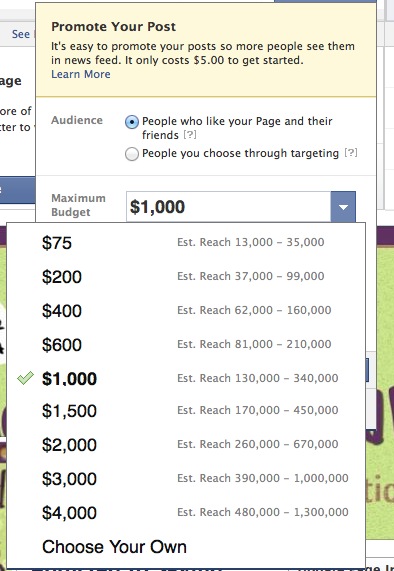
Now I could cry you a river about how this isn’t fair, but ultimately, Facebook can do whatever they want. And what they want is for business pages to “pay” to get their posts shown. They have recently allowed a lower starting point to allow you to see posts from pages you’ve already indicated you’d like to see (irony, anyone?). Here is an example of what I see as they suggest that I “promote” my posts:

Screen Shot 2014-01-22 at 10.12.08 AM

In light of all that, I am going to show you how you can best insure Addicted to Saving’s posts show up in your feed.

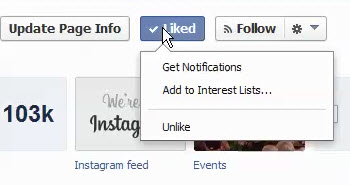
1) Go to Addicted to Saving’s Facebook page and look for the sections that say Liked and Follow right underneath the header:


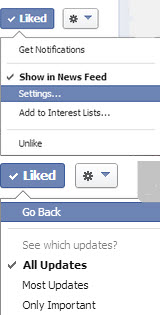
2) Put your cursor over the Liked button and you should see the following:

facebook changes
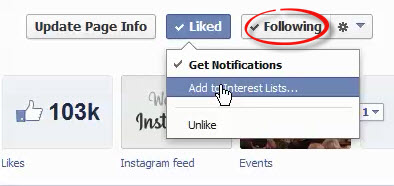
3) Check “Get Notifications.” Also, make sure you are “Following” Addicted to Saving, as indicated by the red circle below. Now, if you want to go even further, then click “Add to Interest Links.”

facebook changes1
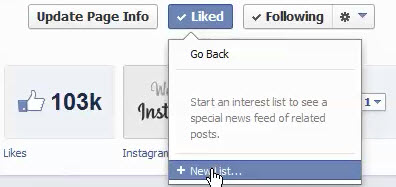
4) Once you’ve clicked Add to Interests Lists, click New List:

facebook changes4
5) Click “Next” on the next screen

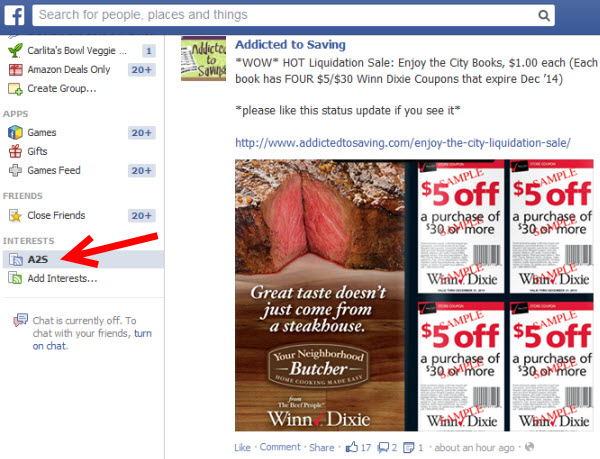
6) Next you will name your List. In this case, I named it A2S. Then you’ll want to choose the security level (who can see your list) - Public, Friends, or Only Me. Once you chosen your security level, click Done.


7) This should take you to your Interest List. You can always access this page from your News Feed. It’s on the left hand side underneath most of your other “groups”; having an Addicted to Saving Interest List set up will help you quickly see all the posts I’ve made.

facebook changes6
I realize that some of you do not have the updated Facebook view (with the Blue background), so if you don’t, you’ll need to follow #1 and #2 above, and click on Show In News Feed. In the “Settings” section, you should be able to check “All Updates” so that you can make sure you see them all.

facebook changes2
If your Facebook doesn’t look like the screenshots above, all I can tell you is to putz around and see if you can find the settings that work on your view. Of course, when you do see my posts, make sure you “like” or “share” them occasionally. The more you interact with the page, the more Facebook “knows” to show you my posts.

There are other ways to stay in touch with Addicted to Saving too.

1) Join the Addicted to Saving Private Facebook Group. This will insure each post gives you an alert, and you can decide for yourself whether or not you’d like to look at that particular post.

2) Sign up for Daily Emails. I only send these once a day with all of the posts from the previous 24 hours. You also have a chance to win $50 each month just by being a subscriber!

3) Follow me on Twitter. Twitter doesn’t screen which Tweets they show. Then you can sign up to receive Text Alerts from Addicted to Saving, or you can use a parsing software like Hootsuite to follow the handles you want.

4) If you’re in the Tampa Bay Area, you can join the Addicted to Saving Tampa Bay Facebook Group. I think the name of this group is self-explanatory. :)

Of course, the easiest way is to simply visit my blog every day! Bookmark it on your toolbar, and, like your morning coffee, come visit me to see what you’ve missed. 😉

Subscribe to daily email updates and be entered for a chance to win $50 cash!


Print Friendly and PDF

Coupon Usage in 2013 - State of the Industry (Yes, People Are Still Using Coupons!)

This post may contain a link to an affiliate. See my disclosure policy for more information.

New here? Like us on Facebook below:

coupons

Back in early 2009, by necessity, I learned how to coupon. Then I told my friends. Then my husband convinced me to start this blog. Nearly 5 years later, I’m still couponing, and so are others.

A lot of people ask me if I think couponing is just a trend. My answer is nuanced - yes, I think it’s *HOT* right now (pun intended), but I also think that people have always couponed. In my seminars there is an interesting stat I give - those people who make more than $75,000/year are more likely to coupon than those who make less than $75,000. Surprising, right? But when you think about it, it makes sense. When people realize they can save money at the grocery and drug store, it gives them more money to spend elsewhere.

So do I think couponing is going away? It will probably cool off, but as long as people understand the value of a dollar, I think it will be around. With that said, I thought you might be interested in the findings of NCH Marketing Services, a Valassis Company, on coupon industry trends that helps give us a picture of the State of the Coupon World. (You can read the full report HERE and all of the below screenshots are credited to them.)

Here are the things I found interesting about the coupon trends for 2013.

People Are Still Using Coupons

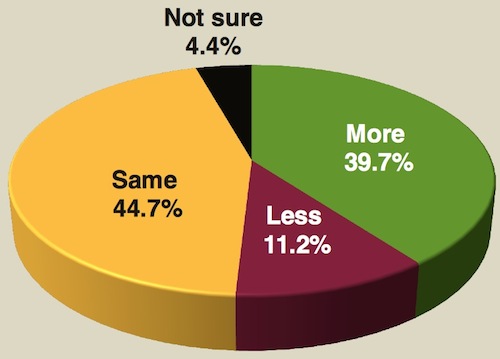
In the study by NCH Marketing Services, they found that 84.4% of people either used more or the same amount of coupons in 2013 as they did in 2012. Only 11.2% said they were couponing less. So are people still couponing? You betcha!

coupon-trends-percentage-of-coupon-usage-from-last-year

The Average Value of a Coupon Went Up

Did you notice higher value coupons last year? If you did, that’s because they were higher valued on average. In 2013, the average value of a coupon went up from $1.53 in 2012 to $1.62, an increase of 5.9%. If you think about it, there are a lot of *HOT* coupons that come and go which are definitely in that high value category, which is why it’s good to check Addicted to Saving a few times a day to make sure you haven’t missed one. 😉


The Average Time to Use a Coupon Went Down

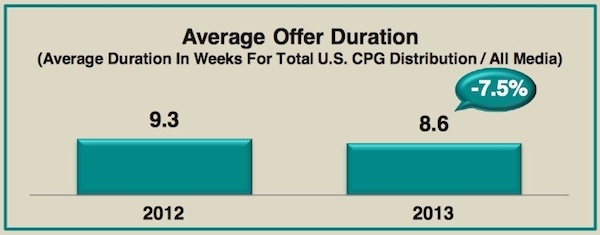
This is also not surprising. Coupons are expiring earlier, which means the manufacturer’s are counting on us redeeming them sooner than later. The average coupon was valid for just 8.6 weeks as compared to 9.3 weeks in 2012. I actually like this fact, because I use a lot of printables anyhow, and print as I need them. I don’t have to hang on to all my inserts quite as long!

coupon-trends-average-duration
Why You Didn’t Redeem Coupons - Your Product Wasn’t Available

According to the study, the predominate reason we didn’t use coupons is because our favorite product never had a coupon! Totally understand this one - seems like coupons for peanut butter and Heinz Ketchup are rare, so I don’t buy them as much as I used to. Then there were those who said we have to buy too much to be able to redeem the coupon - also makes sense. I love a $5.00 off coupon, but if I have to buy $50 worth of a certain product, I’m probably not going to use it.

The Most Coupons Were Redeemed at Walmart

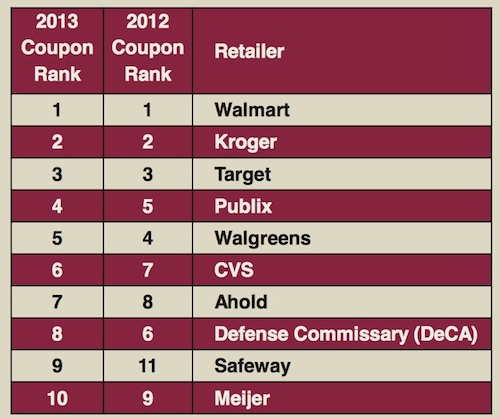
Surprising? I don’t think so. Walmart is one of the biggest stores if not the biggest store in the country, so it makes sense couponers were redeeming them there. The first three spots - Walmart, Kroger, and Target - remained the same in 2013 from 2012. But I like the fact that Publix, my favorite store, moved up to the 4 spot from number 5 last year. Interestingly enough, Walgreens moved down a spot - probably because they are not as coupon friendly! (IMHO). :)

coupon-trends-retailers-where-most-coupons-are-redeemed

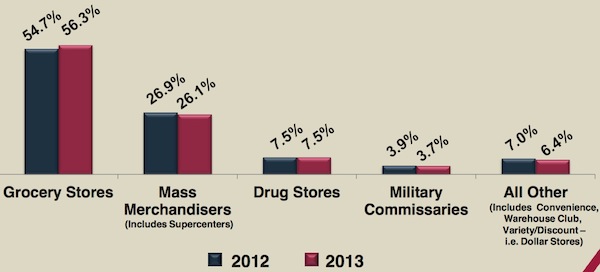
Couponers Are Redeeming Coupons at Grocery Stores More Often

This is a good sign, I think. It means couponers are spending more time at their local grocers than hopping from store to store. Maybe this is because time is a premium and we don’t always have time to drive around time getting the best deal. But I also think it means couponers are becoming more educated, and grocery stores are becoming more accepting of couponers, even if their policies are getting more stringent. I think the rush of couponers after the 2008 recession has caught many of the grocery stores by surprise, which is why so many of them had differing policies from store to store. Now they got their act together, and we’re all on the same page.

coupon-trends-where-coupons-are-redeemed

There was a ton more in this article. For instance, 315 billion dollars worth of coupons were issued in 2013, which was an increase from 305 billion in 2013. That’s a good thing for us!

So is couponing still going strong? I think the answer is a resounding ‘YES’! Things are changing, for sure, but as long as we have to eat and hate paying full price for anything, I think couponing will be around. Here’s to a great 2014!

You can read the full report on the 2013 coupon trends HERE. A big thanks to NCH Marketing Services, a Valassis Company, for their research.

Subscribe to daily email updates and be entered for a chance to win $50 cash!


Print Friendly and PDF

Where to Find Publix Advantage Flyers & Regional Publix Pricing

This post may contain a link to an affiliate. See my disclosure policy for more information.

New here? Like us on Facebook below:

As I’ve noted before, there have been some changes in the way that we are doing coupon matchups in an effort to make it better for you and more efficient for me. (I have a detailed post on this which you can read HERE.)

One of the changes you’ll see is in the way the Publix Advantage Flyers are done. The great thing about this, however, is that you will also get regional pricing for Publix, if you want to take advantage of it. Here’s how it will work:

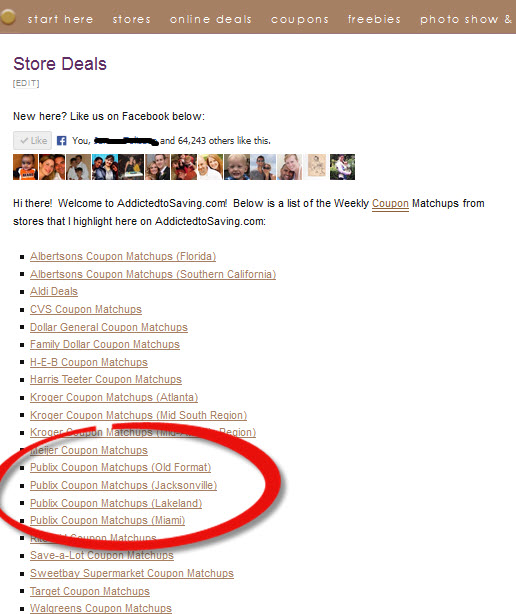
Screenshot #1 - Find the STORES deals page, which you can find by clicking on the menu bar item named STORES, as listed below.

Screenshot #2 - You’ll see that you now have access to regional Publix pricing, like Lakeland, Miami, and Jacksonville pricing, as indicated by the red circle below. **Note that the Publix Old Format link will be the sneak peek ad that I provide every Monday, and that will not likely change moving forward.

publix-screenshot2

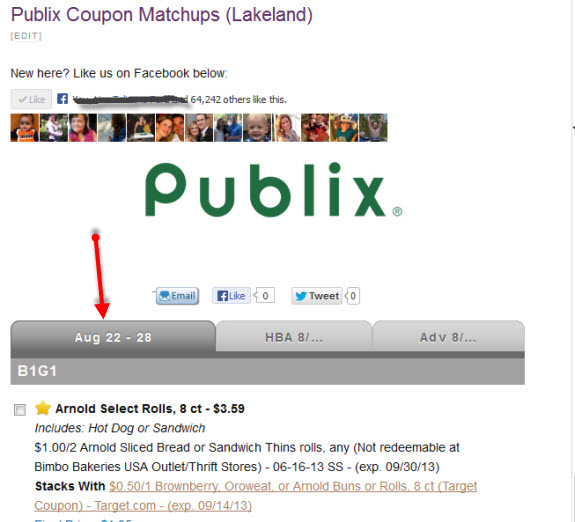
Screenshot #3 - If you click on any of the regional ads, this is where you will see the Publix Advantage Flyers in addition to the regional pricing for the current Publix ad. Below is what it would look like if you’re clicking on the Lakeland Publix ad, for instance. The red arrow below is pointing out the Publix ad for August 22nd - 28th. That tab will always show the current sales cycle ad.

publix-screenshot1

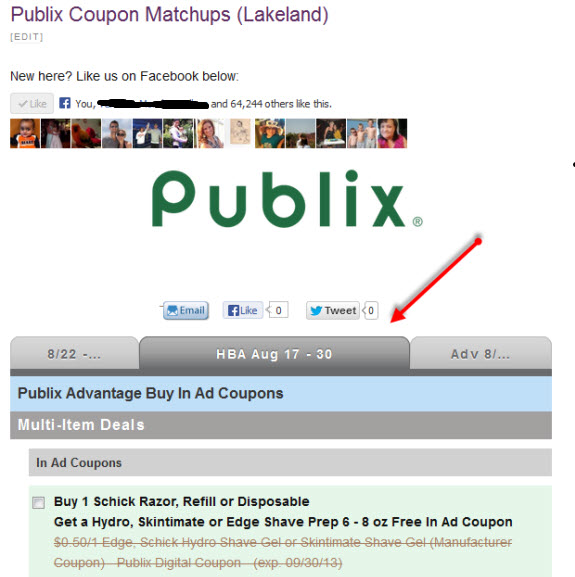
Screenshot #4 - To see the current Health & Beauty Flyer (formerly Green Advantage Flyer), you’ll simply click on the middle “folder” tab, as indicated by the red arrow below:

publix-screenshot3

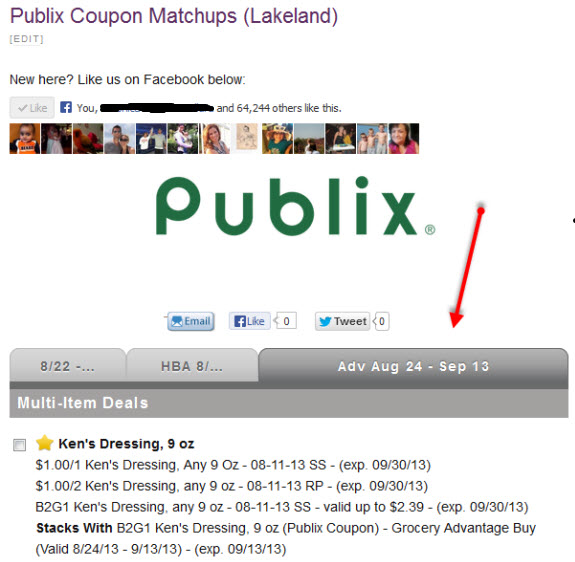
Screenshot #5 - To view the current Grocery Advantage Flyer (formerly Yellow Advantage Flyer), you’ll click on the far right tab as indicated below by the red arrow:

publix-screenshot4

In all of the scenarios for the new format, a gold star indicates a TOP DEAL for that ad.

This is an explanation of how to find the tabs for the new Publix Advantage Flyers, but I will continue to make single posts about it as well when they come available. Hopefully this post will help you navigate your way through these changes. As I’ve said all along, I do believe that this will benefit you, the reader, because it gives more stores, more accurate regional pricing, up to date coupons, and good breakdowns of categories and sales.

That said, I plan on keeping the old format around for the Publix Sneak Peek that I provide on Mondays, so if you’d rather that, it will be located where it always is!

Subscribe to daily email updates and be entered for a chance to win $50 cash!


Print Friendly and PDF

Addicted to Saving 101 - How to Save This Thanksgiving Recap

This post may contain a link to an affiliate. See my disclosure policy for more information.

New here? Like us on Facebook below:

photo courtesy of beautygirlsmom

I’ve posted quite a bit this fall season how to save this Thanksgiving, Black Friday and Cyber Monday and I wanted to make sure you didn’t miss any of my posts since they are filled with tips. Below are all of the posts I’ve written this month. I hope they help you save lots of money!

Addicted to Saving 101 - How to Save on Thanksgiving

Coupons for Your Thanksgiving Meal

Addicted to Saving 101 - How to Cook a Turkey

Addicted to Saving 101 - Frugal Black Friday Tips

Addicted to Saving 101 - Frugal Cyber Monday Tips